Loading
Kiosk check-in
Let clients check themselves in, in seconds
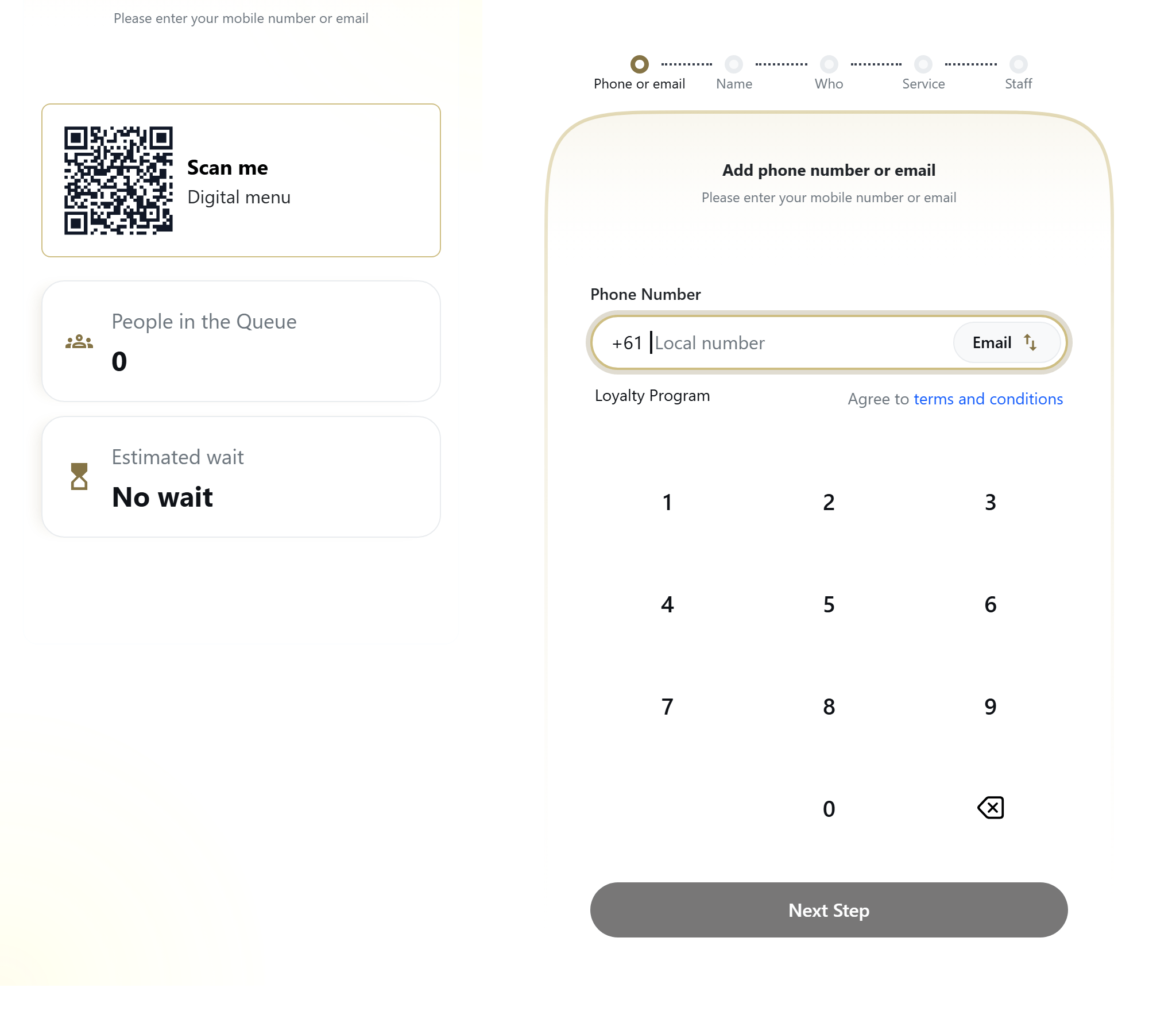
CheckIn is a self-service kiosk that lets clients join your walk-in queue on a shared in-store iPad or on their own phone, with no app to download and no account to create.
The front desk should not be a bottleneck
On a busy Saturday the line to get into line is the real problem. One person fields the door, answers the phone, and runs the floor all at once. Clients pile up at the counter just to say their name and the service they want.
Paper waitlists make it worse. Names get missed, the order gets fuzzy, and the person who actually walked in first ends up waiting longest. Nobody trusts the list, so people hover instead of relaxing.
A self-service kiosk takes that whole intake off the desk. Clients tap through a short flow themselves, land in the live queue, and your team gets back to the chairs.
How kiosk check-in works
A short, guided flow that any client can finish without help.
- 1
Pick a service
The client opens the kiosk and chooses what they came in for from your shop service menu. The list reflects each location catalog, so the options match what that shop actually offers.
- 2
Identify yourself
They enter a phone number or email. Returning clients are recognized instantly from your CRM, and brand-new clients are created on the spot. No login, no password, no account to remember.
- 3
See offers and points
Active promotions for that shop appear during check-in, and enrolled clients see their current loyalty balance, so the perks are visible in the moment that matters.
- 4
Join the queue
One tap drops them into the live walk-in queue with a daily ticket number. From here every connected screen updates the instant they join.
- 5
Step out and come back
If they need to grab a coffee, they can step out and return right from the kiosk, keeping their place in line within a fair grace window.
What the kiosk covers
Guided multi-step flow
Pick a service, identify yourself, join the queue. Each step is simple enough that first-time clients finish it without asking for help.
iPad in kiosk mode
Run it on a shared in-store iPad locked to the check-in screen, so it sits on the counter and works as a true self-service station.
Or the client own phone
Prefer no hardware? Share a public link and clients check in from their own phone. No app download and no account, just a web page.
Live promotions on screen
Active offers for that shop surface during check-in and update the moment you publish them, so the right promotion shows at the right time.
Loyalty balance in the moment
Enrolled clients see their points balance while they check in, a small nudge that turns a one-time walk-in into a returning regular.
Step-out and return
Clients manage their own step-out and return at the kiosk, holding their spot in the queue without tying up your front desk.
Simple device pairing
Pair a new iPad with a short enrollment code. No complex provisioning, no IT project, just enter the code and the device is live.
Shared-device aware
A staff member logging out of their own account does not wipe the kiosk session, so the shared iPad keeps running the check-in flow all day. A heartbeat tells the platform which kiosks are online.
Who it is for
High-volume nail salons
When the rush hits and every tech is busy, the kiosk handles intake so nobody waits at the counter just to get on the list.
Head spas and day spas
A calm, self-paced check-in sets the tone before a relaxing service, instead of a queue at the desk. Clients arrive, tap, and settle in.
Salons of every kind
Hair, beauty, lash and brow, waxing, blow-dry, and massage and wellness. Any walk-in-friendly salon can put intake on a kiosk or a phone link.
Questions, answered
Do clients have to download an app to check in?
No. The CheckIn kiosk runs in the browser. Clients check in on a shared in-store iPad or scan a link to use their own phone. There is no app to download and no account to create.
Can the kiosk run on a regular iPad?
Yes. CheckIn runs on a standard iPad in kiosk mode, locked to the check-in screen. You pair it once with a short enrollment code, set it on the counter, and it works as a dedicated self-service station.
What does a client do at the kiosk?
They follow a short guided flow: pick a service, identify themselves with a phone number or email, and join the live queue. Returning clients are recognized automatically, and new clients are created on the spot.
Does the kiosk show promotions and loyalty points?
Yes. Active promotions for that shop appear during check-in, and enrolled clients see their current loyalty balance, so offers and rewards are visible right when the client is checking in.
What happens if a staff member logs out of the shared iPad?
Nothing breaks. The kiosk is shared-device aware, so a staff member logging out of their own account does not wipe the kiosk session. The iPad keeps running the check-in flow, and a device heartbeat lets the platform know it is still online.
Can clients step out and keep their place?
Yes. Clients can step out and return right from the kiosk, holding their spot in the walk-in queue within a fair grace window, so they can leave for a coffee without losing their place.
See CheckIn on your own salon’s flow
Book a 20-minute demo and we’ll show you the queue, kiosk and loyalty running on a setup like yours.